I am tutoring a class that teaches basic assembler using the mips architecture and spim. Im using linux so i got the source and compiled and installed it. I then began buy running xspim. What a pain no documentation enplaning any thing that I could make sense of. So here I am writing about how I got it to work.
This is how to load an assembler file and make sense of the first screen you see when you first run xspim.
start xspim buy typeing
#> xspim
at the comand line. or buy running it from the /usr/local/bin/xspim
#> /usr/local/bin/xspim
depending on your configuration.
The following window pops up.
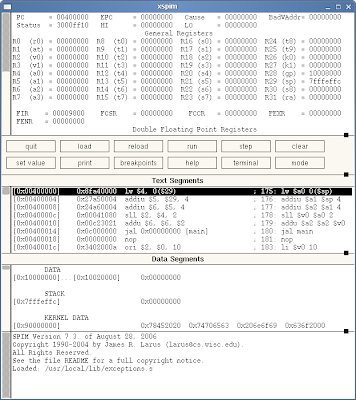
The assembler you can see in the text segment part of the window doesn't run and out puts an error sayin
Instruction references undefined symbol at 0x00400014
jal 0x00000000 [main].
This code that is already loaded comes from the /usr/local/lib/exceptions.s file. It is the assembler code to load and run your file.
You can load your file buy clicking the load button in the middle part of the window. This is will open the following pop window.
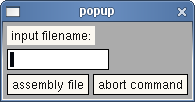
Input the file location relative to the root (/) directory ie as /home/#user/mips/my_file
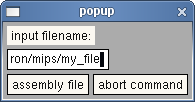
click the assembly file button. You will see that the jal xxxxxxxx [main] command changes to reference your code at memory location xxxxxxxxx. which will be just after the load program code.
the jal xxxxxxxx [main] instruction is a jump and load instruction with the memory address and label [main] being the label. So you need to have a lable in your source code that contains a main label.
my_file looks like this
.text
main: addi $v0, $0, 5 # read into $t1
syscall
add $t1, $0, $v0
addi $t1, $t1, -32 # F -32
addi $t2, $0, 5
mult $t1, $t2 # (F -32) * 5 (mult before div)
mflo $t1
addi $t2, $0, 9
div $t1, $t2 # (F -32) * 5/9
mflo $t1
addi $v0, $0, 1 # print $t1
add $a0, $0, $t1
syscall
addi $v0, $0, 10 # exit
syscall
what's important here is th "main:" part of the code which will be where the jal xxxxxxxx [main] will jump to when running your assembler. Now you can step through your code and run it buy clicking the relevant buttons. You will notice that their args parameter references your mips file. You will need to edit your mips assembler file with an other program like gedit, or scite.
It took me a while to figure out how all this worked as the documentation dose not have a quick start tutorial or any thing like that. I hope this will be use full for some assembler hackers out there.


